
Lens Agents
 Lens Agents
Operate AI agents in your own infrastructure
Connected to the systems your teams already run, governed by enterprise identity and policy, and installed with Helm into your own Kubernetes cluster.
From the makers of the #1 Kubernetes IDE, trusted by the world's best product teams
















Why now
Adoption is ahead of governance
Agents are already at work across the business: engineers against production, sales against CRM data, support against ticketing. Almost none of that work is governed.
The work runs on laptops with personal credentials, and IT cannot see it.
Gartner
Agents act with user credentials, so no action can be attributed to an agent.
Oasis Security
Insufficient governance is the leading cause.
Gartner
How it works
Capability and control from the same platform
Agents need tools and a connection to enterprise systems. Enterprises need identity, policy, and an audit trail. Lens Agents gives you both from one platform.

Connect to real work
Tools and connectivity reach the systems the work lives in, so agents can act on production infrastructure and business data through a governed route.
- Kubernetes clusters, including clusters behind a firewall
- AWS accounts, through assume-role access
- Upstream MCP servers, re-exposed tool by tool under policy
- Any HTTP API, from an OpenAPI document or an allowed domain
Govern every action
Identity, policy, and audit apply to each agent, and credentials and sensitive data stay isolated from the agent and from the model provider.
- Each agent is a principal, with its own token and permissions
- Org policy is a ceiling, so no project can go past it
- Domain, method, and URL path controls at the network boundary
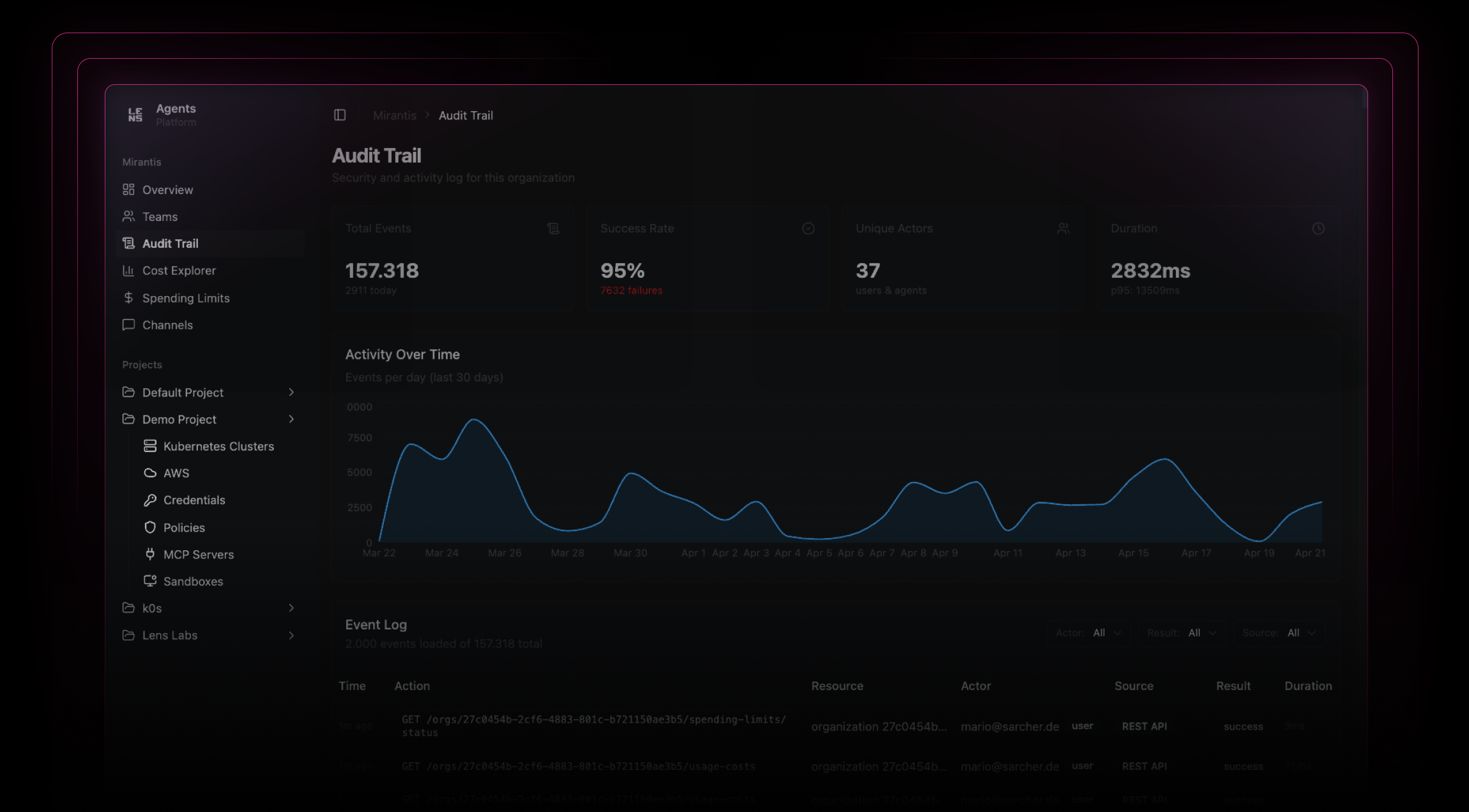
- Every call is recorded, and denials are recorded too
Run it on your own terms
Install the platform with Helm into your own Kubernetes cluster. There is no hosted control plane, so data residency is not a setting you select. It is where you installed it.
- Your public cloud account, your private cloud, or your own data center
- The server, the sandboxes, the database, and the audit trail run in your cluster
- An air-gapped install is possible, with no external connectivity
- No sub-processor for the platform itself, because you operate the stack
One platform
One set of controls for three kinds of agents
Your teams already run agents on laptops, in the cloud, and across frameworks. Lens Agents does not replace them. It brings all three kinds under the same platform.

Your existing AI tools
You supply an MCP client: Claude Code, Claude Desktop, Cursor, your CI, or any other. The tool keeps running where it is today, and its work happens in a sandboxed toolbox in your cluster.

Your in-house agents
You supply a container image, and the platform runs your agent in a sandbox in your cluster: autonomous agents, batch jobs, long-running workers. Each sandbox is a principal, and your code needs no change.

Your next hire
You supply configuration only: Lens Prism, OpenClaw, Hermes Agent, or similar. These agents remember between sessions and live in your messaging apps, and each one runs in your cluster with an identity of its own.
Who it's for
No team has to compromise
Engineering teams
Connect the AI tools you already use to production systems, and keep your workflow as it is.
IT and security leaders
Govern every agent from one platform, with one audit trail across all of them.
Platform engineers
Get identity, sandboxing, a policy engine, and audit as one platform, instead of assembling them from parts.
Business teams
Create agents for your own workflows on a platform that IT has already approved.
Why Lens Agents
Governance that runs in infrastructure you own
Most agent platforms govern only the cloud of their own vendor, and they keep your agent data in it. Lens Agents is installed in your own account or data center, and it governs agents in every environment, including the desktop AI tools where most agent use starts.
| Lens Agents | AWS AgentCore | Microsoft AI Factory | Google Agent Builder | |
|---|---|---|---|---|
| Any cloud, or your own data center | Included | Not included | Not included | Not included |
| Desktop AI tools | Included | Not included | Not included | Not included |
| Any model | Included | Not included | Not included | Not included |
| Active spending enforcement | Included | Not included | Not included | Not included |
Comparison based on publicly available documentation as of April 2026. Capabilities may have changed.
Security
Security the agent cannot bypass
The platform applies each control before the agent reaches a system, before data reaches a model provider, and before a credential reaches an agent process.
Agents are principals
An agent does not act as the person who started it. It has its own identity, its own permissions, and its own line in the audit trail.
Credential isolation
The agent holds a placeholder, and the platform substitutes the real secret at the network boundary. An agent that leaks all it can read leaks placeholders.
Enforcement in the kernel
Kernel-level rules give a sandbox one route out: a proxy that the agent does not control. There is no instruction that can turn it off.
Every call is recorded
Seven interaction surfaces are recorded: MCP tools, shell commands, sandbox operations, and the Kubernetes, AWS, forward, and model proxies. Denials included, and exportable.
PII controls
Masking runs before a prompt leaves the platform, so what reaches the model provider can be less than what the agent wrote.
Data sovereignty
Credentials are encrypted with AES-256-GCM and tokens are stored as hashes, in the database in your own cluster. Retention and backup stay your policy.
Enterprise
Ready for the enterprise on the first deployment
Single sign-on, a multi-tenant hierarchy, spending controls, and EU AI Act support are part of the platform.
OIDC single sign-on
Point the install at your own identity provider. Okta, Entra ID, and JumpCloud are validated, and any OIDC provider works.
EU AI Act readiness
Article 50 transparency applies since August 2026. Agent identity, the audit trail, and autonomy levels cover its four requirements.
Multi-tenant
An organization, team, and project hierarchy, with role-based access control and an org policy ceiling above all of it.
Deployment options
Helm install into your own Kubernetes cluster, in a public cloud, a private cloud, or an air-gapped data center.
Spending controls
Budget limits at organization, team, and agent level, enforced at the proxy that every model call passes through.
Cluster connectivity
Tunnel mode connects clusters behind a firewall, so agents reach them with no public endpoint and no VPN to open.
API, CLI, and MCP
Drive the platform from a REST API, the CLI, an MCP endpoint, or the admin UI. Each one applies the same RBAC, policy, and audit.
Security program
Built under the Mirantis control framework, which holds ISO 27001. Annual third-party penetration tests and a HackerOne bounty program.
Pricing
Pricing starts with a conversation
You install Lens Agents in your own infrastructure and you use your own model provider, so your terms follow your deployment.
Pay for use
Cost follows the work your agents do, and it stops at the budget ceiling you set.
Your own model provider
Inference goes to a provider you own: a managed cloud service, an OpenAI-compatible endpoint, or a model you host yourself. The platform holds the key, not the agent.
Enterprise terms
Volume terms, procurement documents, and support levels are part of the conversation. Tell us what your organization needs.
Put your agents in production
Start with a walkthrough in your own environment, or read the documentation first.