


How to Use Trivy with Kubernetes: From CLI to CI/CD to Lens
Every container image you deploy, every configuration you apply, and every dependency you include is also a potential attack surface. When it comes to security vulnerabilities in containerized applications, you might face vulnerabilities that can easily lead to data breaches or unauthorized access.
Vulnerability scanning is essential for microservices, and in the Kubernetes (K8s) ecosystem you need tools that can scan images for known CVEs, detect manifest misconfigurations, and also integrate seamlessly into your workflows.
In this article, we will explore Trivy, one of the most popular open-source security scanners, and walk you through practical examples of using it from the CLI and CI/CD pipelines, as well as how it integrates with the Lens Kubernetes IDE.
What is Trivy?
Trivy is an open-source security scanner developed by Aqua Security that is designed to be comprehensive, fast, and easy to use. With Trivy, you can scan multiple targets for different types of security issues such as:
- Container images: Get vulnerability information about your OS packages and language-specific dependencies
- Filesystem and repositories: Scan your Git repositories and also local projects
- Kubernetes manifests: identify misconfigurations in your YAML manifests
- Infrastructure as Code (IaC): Terraform, OpenTofu, CloudFormation, and others
- Software Bill of Materials (SBOM): Generates and scans SBOMs for compliance
Trivy has its own vulnerability database, which is automatically updated and includes data from sources such as the National Vulnerability Database (NVD), vendor security advisories, and others.
Using Trivy from the CLI
Before starting with an example, you need to first install Trivy on your operating system. To do that, head over to Trivy’s website, and follow the instructions for your operating system.
First, let’s start with something simple: let’s scan an old nginx image:
trivy image nginx:1.15.0

Total: 289 (UNKNOWN: 9, LOW: 69, MEDIUM: 65, HIGH: 107, CRITICAL: 39)
The output is huge, as this old image has over 289 vulnerabilities, of which over 140 are High or Critical. It also shows you a table with CVE IDs, all severity levels, affected packages, their installed versions, and the fixed versions.
Let’s now scan a newer version of nginx that is Alpine based:
trivy image nginx:1.29-alpine

# In this case, the image will have 0 vulnerabilities.
We can see that this image has no vulnerabilities yet. Being Alpine-based images makes them smaller, reducing the attack surface. Version 1.29 is the latest (at the time of writing) and includes patches for the known CVEs.
Now, lets take a look at a simple Kubernetes deployment that uses this image:
apiVersion: apps/v1
kind: Deployment
metadata:
 name: nginx-secure
 labels:
   app: nginx
spec:
 replicas: 1
 selector:
   matchLabels:
     app: nginx
 template:
   metadata:
     labels:
       app: nginx
   spec:
     containers:
     - name: nginx
       image: nginx:1.29-alpine
       ports:
       - containerPort: 80
You can run Trivy on this manifest by using:
trivy config deployment.yaml

Report Summary

┌─────────────────┬────────────┬───────────────────┐
│     Target      │    Type    │ Misconfigurations │
├─────────────────┼────────────┼───────────────────┤
│ deployment.yaml │ kubernetes │        18         │
└─────────────────┴────────────┴───────────────────┘
Failures: 18 (UNKNOWN: 0, LOW: 11, MEDIUM: 4, HIGH: 3, CRITICAL: 0)
You will see issues related to missing resource requests and limits, missing security Context, and others. Let’s fix some of the High Severity ones:
apiVersion: apps/v1
kind: Deployment
metadata:
 name: nginx-secure
 labels:
   app: nginx
spec:
 replicas: 1
 selector:
   matchLabels:
     app: nginx
 template:
   metadata:
     labels:
       app: nginx
   spec:
     containers:
     - name: nginx
       image: nginx:1.29-alpine
       ports:
       - containerPort: 80
       securityContext:
         readOnlyRootFilesystem: true      # KSV-0014
         allowPrivilegeEscalation: false   # KSV-0118
         runAsNonRoot: true                # KSV-0118
         runAsUser: 101                    # nginx user in alpine
trivy config deployment-fix.yaml

Report Summary

┌─────────────────────┬────────────┬───────────────────┐
│       Target        │    Type    │ Misconfigurations │
├─────────────────────┼────────────┼───────────────────┤
│ deployment-fix.yaml │ kubernetes │        14         │
└─────────────────────┴────────────┴───────────────────┘

Failures: 14 (UNKNOWN: 0, LOW: 11, MEDIUM: 2, HIGH: 1, CRITICAL: 0)
Configuring Trivy
Command-line flags work well for quick scans, but you can also use a configuration file with Trivy. By doing so, it will be easier for you and your team to use Trivy consistently. To configure Trivy, you should create a trivy.yaml file in your project root:
scan:
 scanners:
   - vuln
   - secret
   - misconfig

severity:
 - CRITICAL
 - HIGH
 - MEDIUM

vulnerability:
 ignore-unfixed: true

image:
 removed-pkgs: true

misconfiguration:
 checks:
   - kubernetes

format: table

exit-code: 1
For example, the configuration above tells Trivy to scan for vulnerabilities, secrets, and misconfigurations, and to alert on Critical, High, and Medium severity vulnerabilities. In addition, it tells Trivy to ignore vulnerabilities without available fixes, check for removed packages that might still have CVEs, apply Kubernetes-specific checks, and output results in a table format. Last but not least, it tells Trivy to exit with an exit code of 1 (error) if issues are present, making it very useful for CI/CD pipelines.
Now, if we run the same checks using this config, we’ll see fewer misconfigurations because we are ignoring the Low-severity ones.
trivy config --config trivy.yaml deployment-fix.yaml

Report Summary

┌─────────────────┬────────────┬───────────────────┐
│     Target      │    Type    │ Misconfigurations │
├─────────────────┼────────────┼───────────────────┤
│ deployment.yaml │ kubernetes │         3         │
└─────────────────┴────────────┴───────────────────┘

Failures: 3 (MEDIUM: 2, HIGH: 1, CRITICAL: 0)
You can also mention what checks you want to ignore by creating a .trivyignore file. This is especially useful if you want to exclude false positives or known vulnerabilities.
For example, this is the only High severity vulnerability that we have, and let’s suppose we want to ignore it:
KSV-0118 (HIGH): deployment nginx-secure in default namespace is using the default security context, which allows root privileges
To do that, you will need to create a .trivyignore file and add the vulnerability name in there:
#.trivyignore
KSV-0118
Next, lets run the scan and see the output:
trivy config --config trivy.yaml --ignorefile .trivyignore deployment-fix.yaml

Report Summary
┌─────────────────────┬────────────┬───────────────────┐
│       Target        │    Type    │ Misconfigurations │
├─────────────────────┼────────────┼───────────────────┤
│ deployment-fix.yaml │ kubernetes │         2         │
└─────────────────────┴────────────┴───────────────────┘

Failures: 2 (MEDIUM: 2, HIGH: 0, CRITICAL: 0)
Using these configuration files makes implementing shift-left in your CI/CD pipelines easier, ensuring consistent security policies across all environments.
Managing Security with Lens Kubernetes IDE
Visualizing security across all your Kubernetes clusters can be really challenging and that’s where Lens Kubernetes IDE comes in.
With Lens, you get real-time visibility into all your workloads, simplifying complex operations. You get context-aware navigation out of the box, a built-in terminal, Helm and CRD support, and native integrations with AWS EKS and Azure AKS. Also, Lens has a built-in AI assistant called Lens Prism that can help you understand what is happening in your clusters, by simply asking plain English questions.
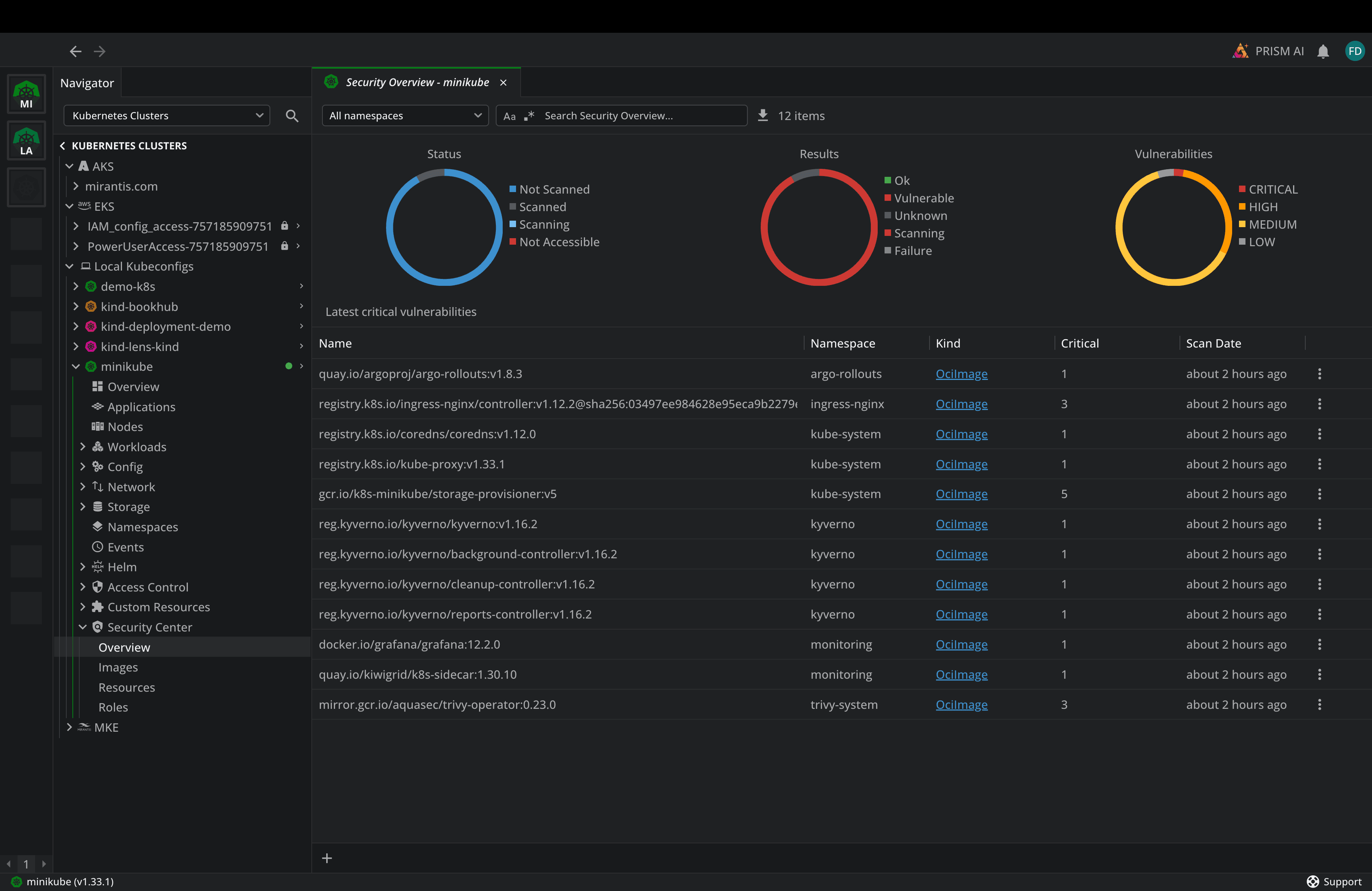
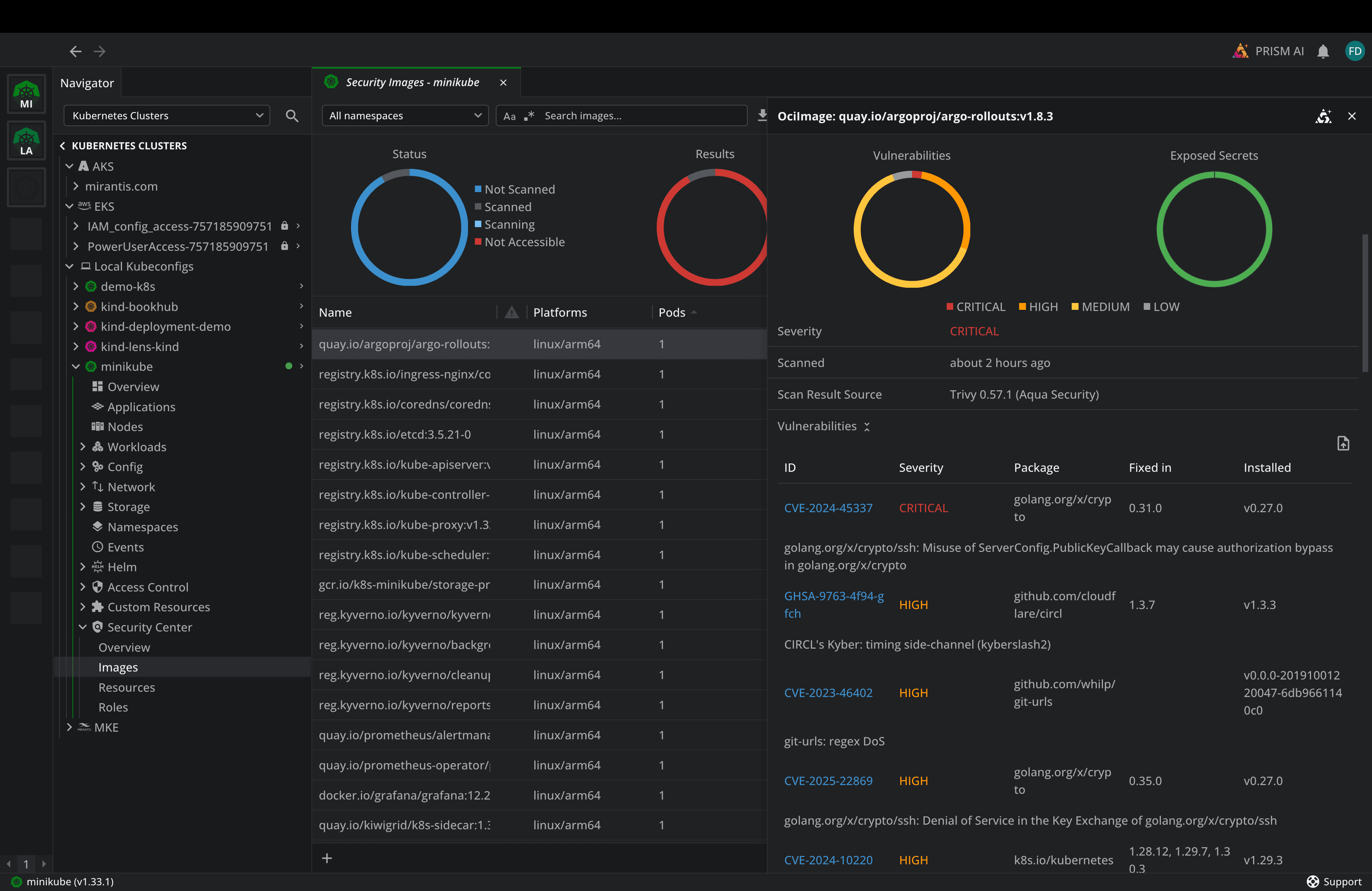
In addition to that, Lens includes a Security Center that leverages the Trivy operator to get security information about your Images, Roles, and Kubernetes resources:
By going to the images, for example, you can see, at a glance, how many images are ok and how many have vulnerabilities, see how many pods are using a particular image, and what kind of vulnerabilities they have:
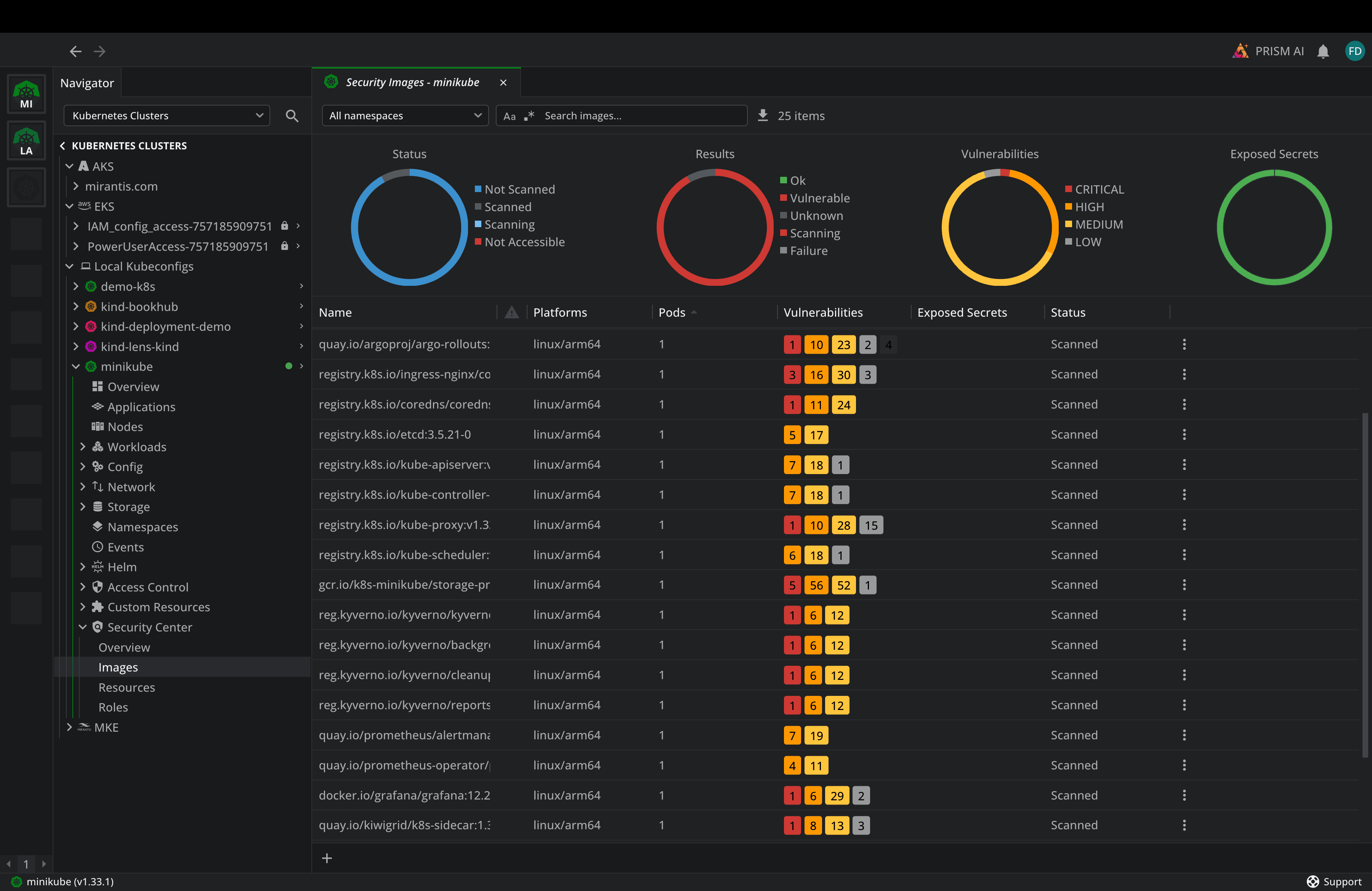
By clicking either image, you can easily see the CVEs, their severity, the vulnerability message, and a hyperlink to the CVE page with potential mitigations.
Similarly, if you go to Resources or Roles, you will see different types of vulnerabilities and their resolutions.
Learn more about the Lens Security Center:
Conclusion
Security in Kubernetes is an ongoing process that requires using the right tools and workflows. Trivy provides a solid foundation for implementing shift-left, enabling you to scan for vulnerabilities in images, manifests, and even infrastructure-as-code.
By combining Trivy’s scanning capabilities with Lens’ visualization and management features, and using it directly in the built-in Security Center, you get the visibility you need to maintain secure Kubernetes environments.
To learn more about how Lens Kubernetes IDE can help you with your security posture, book a demo with one of our engineers.