What's new in Lens Desktop 2026.5
TL;DR
Lens Desktop 2026.5 comes equipped with:
- Navigator support for the Kubernetes Gateway API.
- Support for Kubernetes Admission Policies.
- Premium Features dashboard updates for the Lens Plus trial.
Gateway API support in the navigator
The Gateway API is the standard replacement for Ingress and covers ten resources that route traffic from outside the cluster to your services, and between services inside the cluster. It is the next generation of Kubernetes ingress, load balancing, and service mesh APIs.
The role-oriented design splits responsibility across the three teams that usually own networking. The infrastructure provider runs the load balancer or service mesh, the cluster operator configures it for the cluster, and the application developer points routes at workloads.
The hierarchy is small. A GatewayClass picks the controller that implements the gateway (for example gke-l7-rilb, istio, nginx, envoy, cilium, AWS Load Balancer Controller, Kong, or Contour).
A Gateway is an instance of that infrastructure listening on a hostname and port. Routes (HTTPRoute, GRPCRoute, TCPRoute, UDPRoute, TLSRoute) send matching requests to backend Services, one resource per protocol.
Header matching, weighted canary traffic, native gRPC, and cross-namespace references become regular Kubernetes spec fields, replacing the vendor-specific annotation strings that Ingress required.
Gateway API in Lens
Lens Desktop 2026.5 adds full support for all ten resources, covering Gateway, GatewayClass, HTTPRoute, GRPCRoute, TCPRoute, UDPRoute, TLSRoute, ReferenceGrant, BackendTLSPolicy, and ListenerSet.
Services show the Gateway API routes that target them in a unified Routes tab. The group stays hidden on clusters without the CRDs installed.
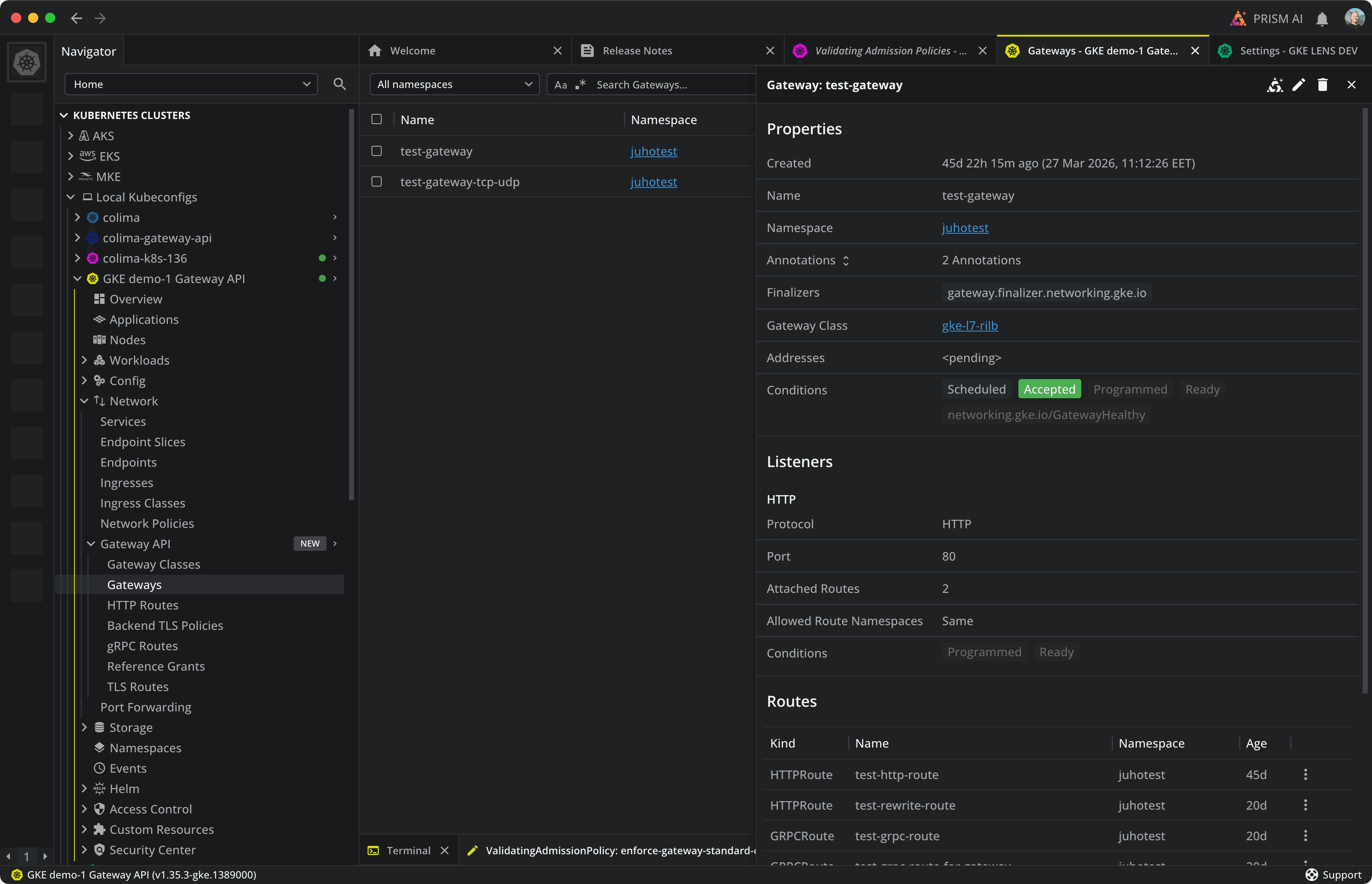
The picture above shows a GKE cluster with Gateway API configured, visualized in Lens. The test-gateway detail panel exposes its Listeners and attached Routes. Services receive the same Routes tab, surfacing HTTP, gRPC, TCP, UDP, and TLS routes in one place.
What Lens added
- A dedicated Gateway API navigator group. All ten resources live in their own sidebar group instead of buried under "Custom Resources". They sit next to Services and Ingresses, the way the spec organizes them.
- Typed detail panels per resource. Gateway shows Properties, Listeners, and attached Routes. HTTPRoute shows Hostnames, Rules, and Backends. No generic YAML viewer: each resource has a panel built for its shape.
- A new Routes tab on Services. The panel lists every Gateway API route targeting the workload across HTTP, gRPC, TCP, UDP, and TLS, grouped by parent gateway and hostname. The Ingress Rules tab, extended to every protocol.
- Create-resource templates and Lens Prism integration. The Create Resource dialog ships templates for Gateway, HTTPRoute, GRPCRoute, and the rest. Right-clicking any Gateway API resource opens Lens Prism actions for explaining a route or tracing a traffic flow.
Admission policies, with readable CEL
Admission policies intercept every create, update, or patch during the API server's admission phase, before persistence to etcd. ValidatingAdmissionPolicy and MutatingAdmissionPolicy replace external webhook controllers with Common Expression Language (CEL) evaluated inside the API server. No extra Pod, network hop, or certificate rotation.
Typical uses: limit Deployment replicas, require an owner label on workloads, restrict container images to trusted registries, or block hostNetwork outside system namespaces. Lens Desktop 2026.5 adds a dedicated Admission Policies navigator group with typed detail panels and CEL syntax highlighting.
Admission policies in Lens
Native admission policies remove the operational tax of a webhook controller. Reading raw YAML is still the problem: a CEL expression in validations[0].expression and the matchConditions plus parameter references can span dozens of lines.
Lens Desktop 2026.5 renders each policy as a structured detail panel. Every VAP and MAP has a typed detail panel with sections for properties, match conditions, validations, parameters, and audit annotations. CEL expressions render with theme-aware syntax highlighting.
With Lens, the full policy stays visible without scrolling through nested YAML.
# ValidatingAdmissionPolicy.spec.validations[0]
expression: "object.spec.replicas <= 5"
message:    "Deployments may not exceed 5 replicas in this namespace"
reason:     Invalid

# matchConditions: only enforce on Deployments, skip system namespaces
matchConditions:
  - name:       "exclude-kube-system"
    expression: request.namespace != "kube-system"
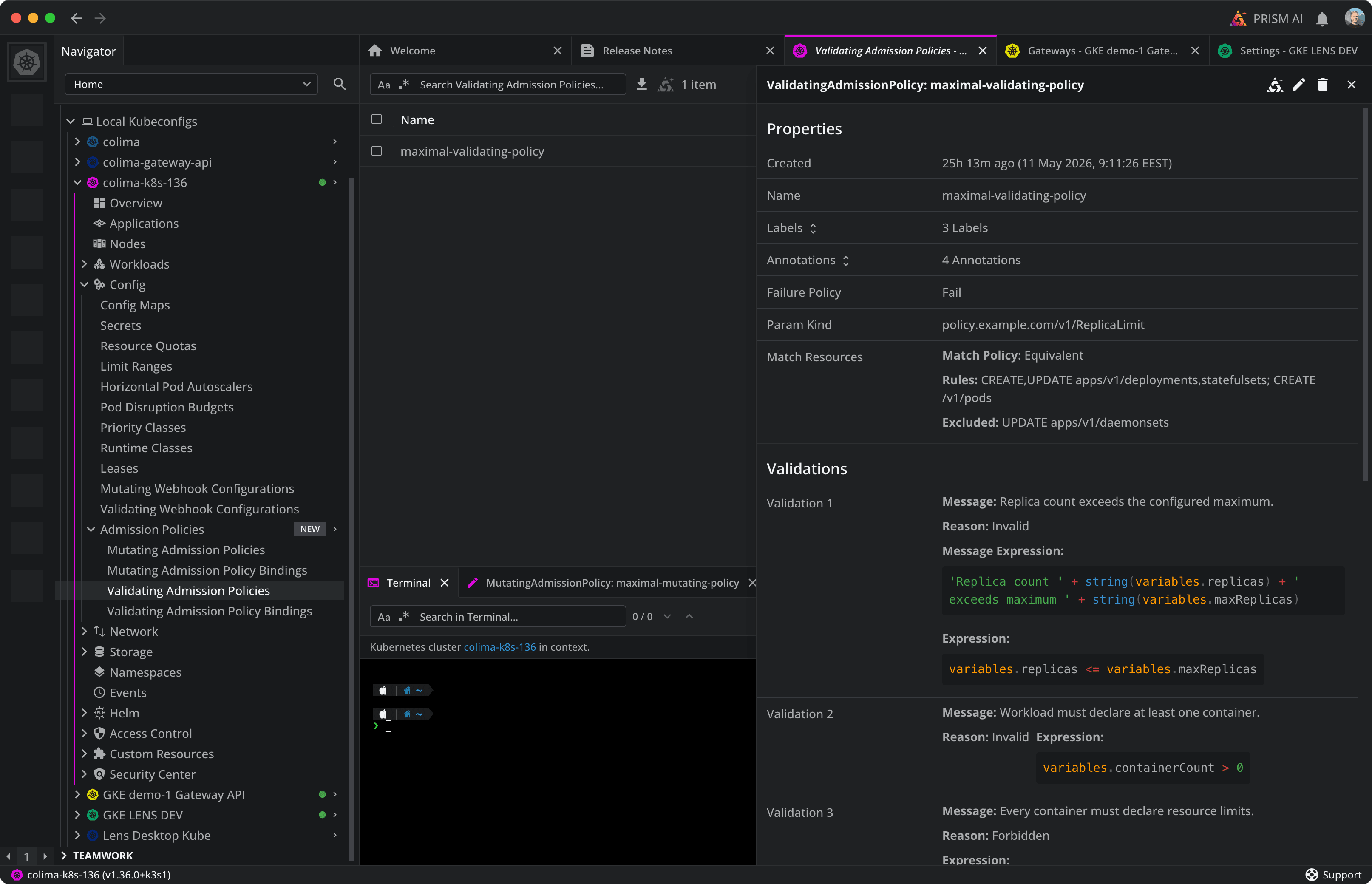
The following image shows the new Admission Policies navigator group with all four resource types: ValidatingAdmissionPolicy, ValidatingAdmissionPolicyBinding, MutatingAdmissionPolicy, and MutatingAdmissionPolicyBinding. On the right, the detail panel for a ValidatingAdmissionPolicy displays its Properties (Failure Policy, Param Kind, Match Resources) and its Validations, each with a Message, Reason, and CEL expression rendered with syntax highlighting.
What Lens added
- A dedicated Admission Policies navigator group. VAP and MAP get their own group instead of mixed in with generic CRDs. It only appears on clusters that expose these resources.
- Typed detail panels for VAP and MAP. Each policy renders matchConditions, validations, audit annotations, and parameters as structured sections, readable at a glance.
- Theme-aware CEL syntax highlighting. A shared CEL highlighter colors keywords, operators, and literals in both light and dark themes. The same package will power future CEL surfaces in Lens.
- Create-resource templates. The Create Resource dialog scaffolds both VAP and MAP from a working policy, not an empty editor.
Premium Features: trial status
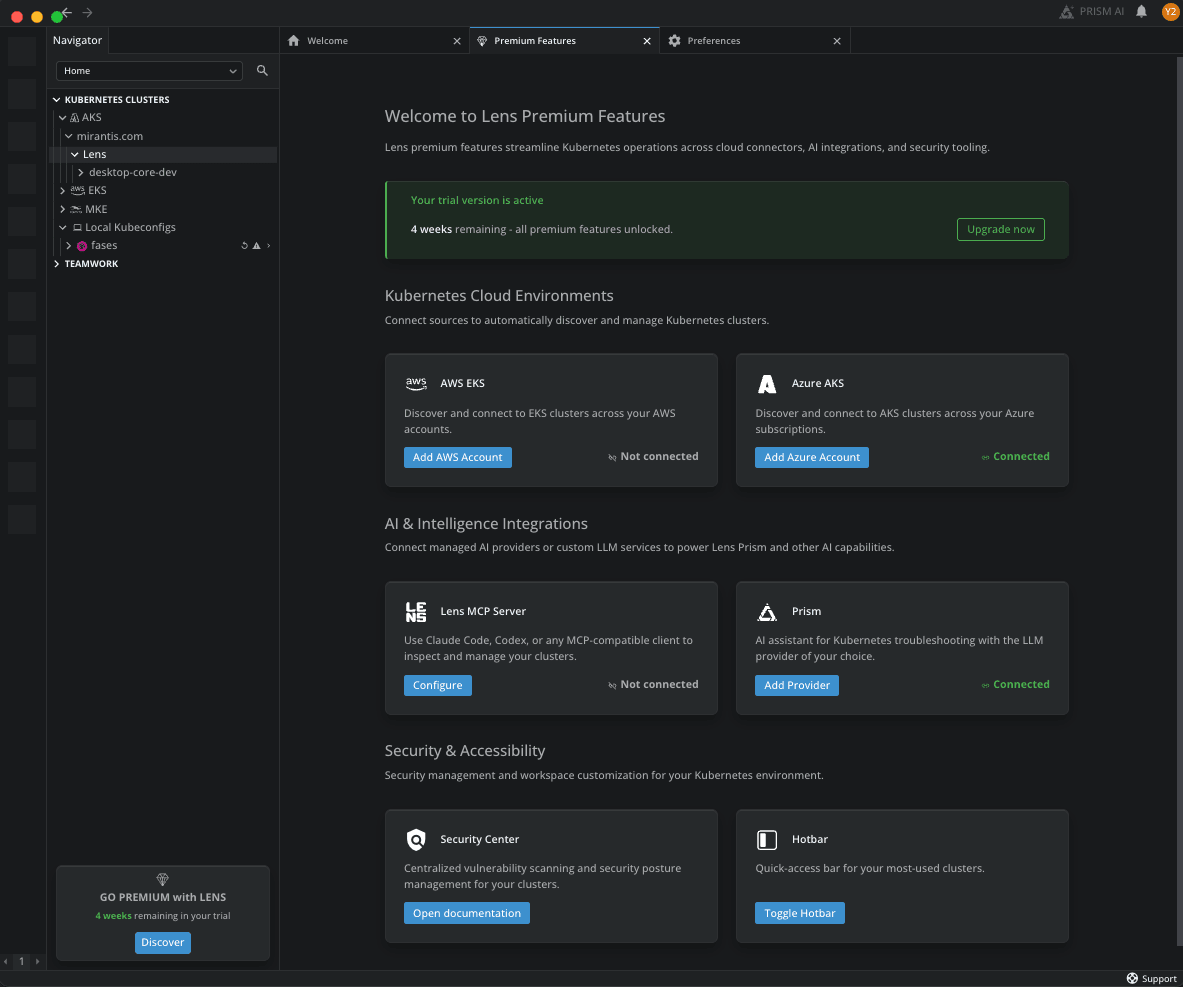
When a new user signs up, a 30-day Lens Plus trial starts with full access to all Premium features. The Premium Features dashboard shows the trial status, including the remaining days, whether each feature is configured, and a button to access each feature's configuration.
Visible features in dashboard
The dashboard is accessible from the GO PREMIUM button at the bottom of the navigation panel.
The dashboard shows the following Premium features:
- Kubernetes Cloud Environments. EKS and AKS connectors that auto-integrate cloud clusters from AWS and Azure accounts.
- Lens Prism. AI assistant that answers questions about your live clusters using natural language.
- Lens MCP Server. Connects external AI assistants to your clusters via the Model Context Protocol.
- Security Center. Vulnerability scanning and security reports for container images across your connected clusters.
- Hotbar. Customizable toolbar with shortcuts to your most-used clusters, workloads, and resources for one-click access.