


AI Improvements and Azure Integration in Lens 2026.1
Lens Desktop 2026.1 has been released and is now available to download. It helps platform and DevOps teams operate Kubernetes more efficiently with native Azure AKS integration, Prism AI improvements, and UX updates that reduce friction in daily workflows and speed up troubleshooting.
Why is this upgrade relevant to you?
Lens native integration with AKS
Azure powers a large share of day-to-day Kubernetes operations, but accessing Azure Kubernetes Service (AKS) clusters can still feel like a checklist of sign-ins, command-line tools, and kubeconfig management before you even start. Lens Desktop 2026.1 reduces that cloud setup friction so you can get productive faster.
In a previous release, Lens introduced native integration with AWS EKS. Now, based on user requests, we are bringing the same high-efficiency experience to Azure Kubernetes Service: faster access, simpler connectivity, and less overhead across your clusters.
- Get into Azure Kubernetes Service clusters faster with native integration and discovery.
- Reduce manual setup and credential juggling across clusters.
- Stay connected with fewer repeated sign-ins.
The real win is efficiency: fewer repetitive steps, fewer tools to manage, and fewer chances for credentials and kubeconfigs to slow you down, especially when you are working across many clusters.
You can read the full announcement and setup guide in our blog: Lens AKS Integration. Or check out the video of how it works:
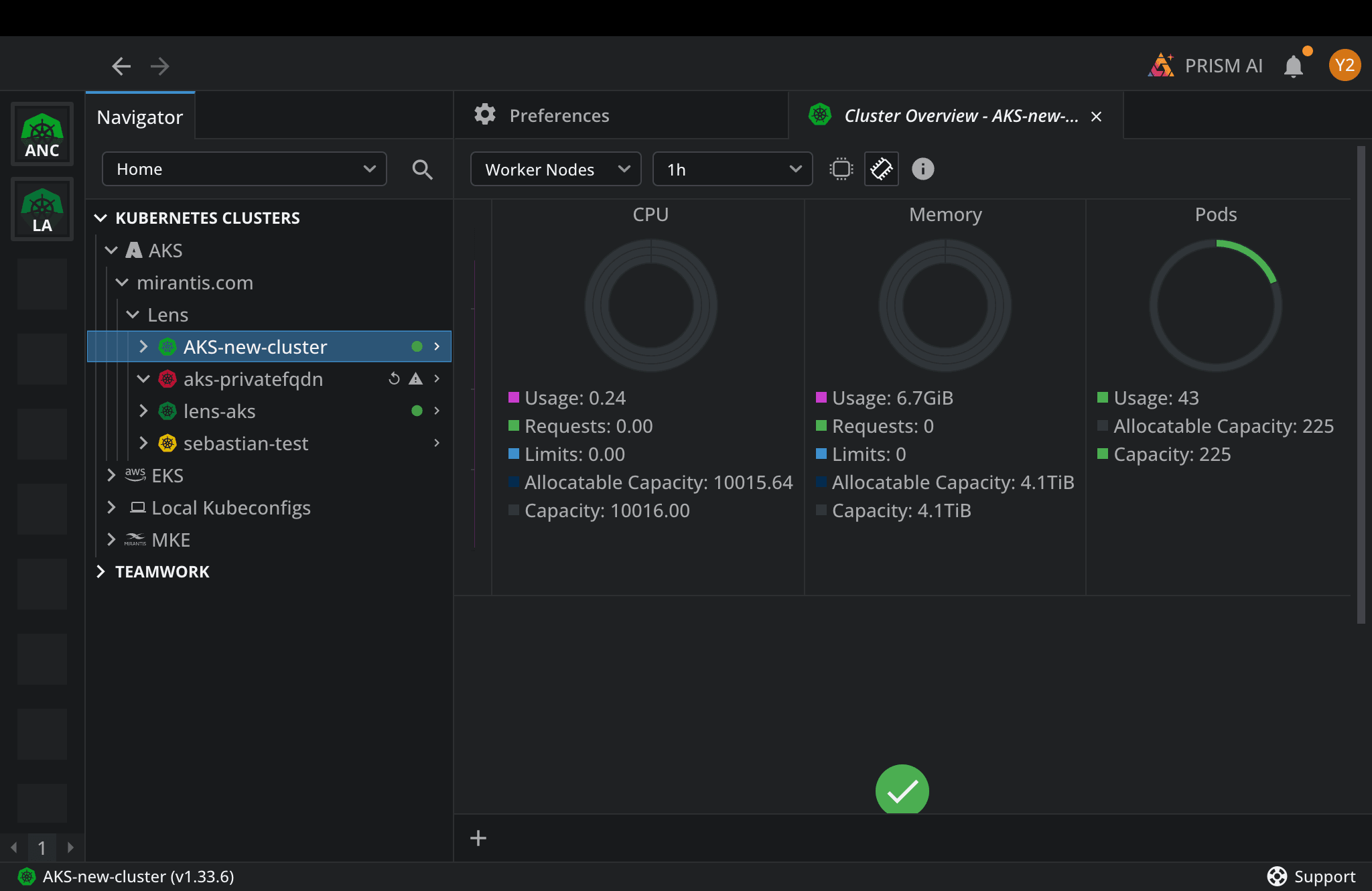
The image below illustrates Lens IDE automatically discovering and loading the Azure AKS Kubernetes clusters that the user has access to. In the Navigator panel under Kubernetes Clusters > AKS, the accessible clusters are listed and ready to select, showing that once access is granted, Lens IDE surfaces those clusters automatically for management and monitoring.
Kubernetes operations with AI, Lens Prism AI
With Lens Prism AI, you can operate Kubernetes using natural language with awareness of live cluster context, directly in Lens IDE. It helps you analyze logs faster, understand Kubernetes context automatically, and surface clear insights and next steps from the signals already in your cluster. With Prism AI, tasks that can take hours to piece together across logs, events, and resources can often be reduced significantly, so you can troubleshoot and operate with less effort and more confidence.
Prism AI improvements in this release are designed to make AI responses more actionable while you are debugging and operating:
- Improved tool call results and summarization: clearer, more accurate answers with less back-and-forth so you can diagnose issues and decide next steps sooner.
- Model and mode selection in the Message Composer: switch how Prism responds right where you type (for example, faster versus more detailed) without leaving your workflow or digging through settings.
- Clickable resource links in AI responses: jump directly from the AI guidance to the Kubernetes resource it references, reducing manual searching and speeding up troubleshooting.
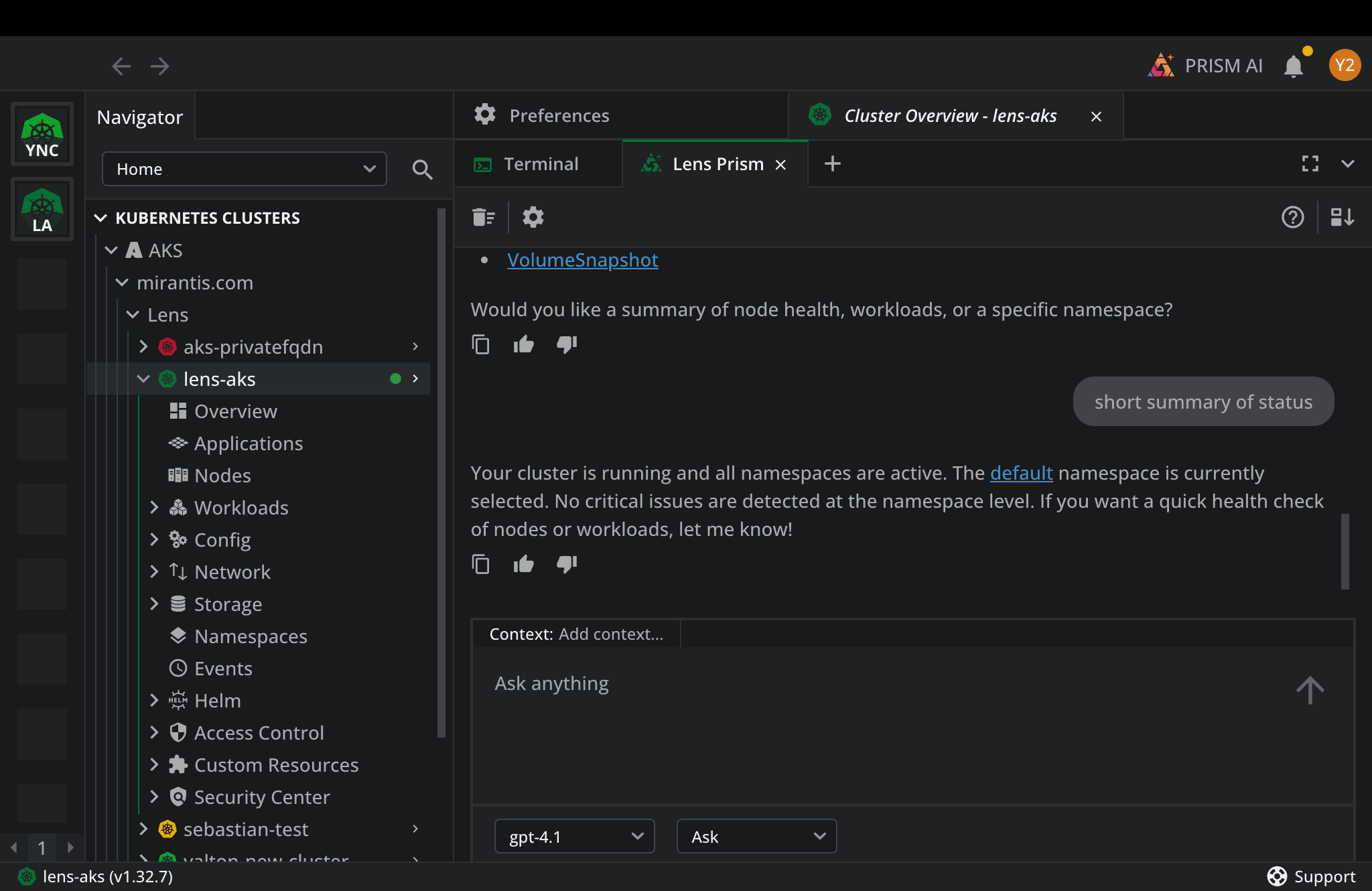
The image below illustrates Lens IDE AI (Prism AI) running a full cluster assessment from a single natural language prompt, “summarize the status of the cluster,” giving cloud platform teams a faster way to troubleshoot and operate Kubernetes without relying on many kubectl commands.
Next steps
Upgrade to Lens 2026.1 to start using the new Azure Kubernetes Service integration and the latest Prism AI improvements in your daily workflow. This stable release is rolling out gradually, and you can also download it manually if you want it right away.
Prism AI and the Azure integration are premium features available in Plus, Pro, and Enterprise subscriptions.
Learn more
For the complete list of improvements and fixes included in this release please refer to:
Release notes: https://forums.k8slens.dev/t/lens-2026-1-161237-latest-release/6748
To dive deeper into Azure Kubernetes Service integration details and setup, continue here: https://lenshq.io/blog/lens-aks-integration
Introduction to PrismAI:
https://lenshq.io/blog/introducing-lens-prism
Download Lens: