


Accelerate Kubernetes Operations with Lens Premium Features
Operations engineers and developers are facing recurrent issues when managing Kubernetes (K8s) clusters. They need to pull kubeconfig files, configure credentials, and repeat the process for every cluster they have in their organization.. When something breaks, hard troubleshooting starts by investigating resources, understanding configurations, and correlating logs with events. This becomes a difficult, time-consuming task.
The CNCF 2025 Annual Survey reveals that 82% of organizations run Kubernetes in production, with the main challenges being complexity and knowledge gaps. The recurring, manual work required to manage and operate Kubernetes is slowing down organizations and burning out their engineers.
This article explores how Lens Premium features help operations engineers and developers address the complexity of managing Kubernetes at scale.
Multi-Cloud Cluster Discovery
When a new engineer is onboarded to the project or a new cluster is deployed, the same process repeats: navigating consoles, configuring access and credentials, and generating, distributing, and maintaining kubeconfig files. Across multiple accounts and regions, this friction can be a source of productivity drain.
Lens Kubernetes IDE overcomes the connectivity challenge by integrating with the most relevant cloud providers, enabling the product to auto-discover the clusters to which the user has access to. One notable differentiator is that the integration is not agent-based; nothing is installed in the cluster. When the user gets access granted through SSO or RBAC, Lens automatically imports the cluster. The main functionalities are:
- Agentless auto-discovery: no installation required inside your clusters
- EKS (AWS) and AKS (Azure) already available, GKE (Google Cloud) coming soon
- Respects existing IAM and RBAC
- Connects through standard Kubernetes APIs
- AWS, Azure, and on-prem clusters in one IDE
AWS EKS Integration
Azure AKS Integration
Prism AI assistant to improve Kubernetes management
The operational challenges of managing Kubernetes, as outlined in the introduction, traditionally demand more people, time, and tools. This approach simply does not scale.
Lens Prism AI changes this paradigm, turning hours of investigation and planning into minutes. It delivers accurate insights with full cluster visibility and context by correlating kubectl output, metrics, and logs, then describing issues and proposing actionable solutions.
Prism AI in a nutshell:
- Get information about your resources: click on any resource, and you’ll see the option to use Lens Prism. It can summarize what the resource does, analyzes events, pulls metrics and logs, shows related resources
- Visible reasoning: shows its thinking, root cause analysis, and suggested remediation. Read-only mode, you stay in control
- One-click warnings: click a warning triangle, get an explanation and a fix
- Clickable links: navigate directly to referenced resources
- Fast or detailed mode: adjust depth without leaving the chat
Prism AI works within your existing Kubernetes RBAC permissions and is compatible with any OpenAI-compatible LLM provider, including local endpoints for air-gapped environments.
See Prism AI in action:
Enterprise Solution: Security, Compliance, and Operational Control
Enterprises aim to increase productivity while also achieving centralized control, identity management, and audit-ready infrastructure, all without compromising on compliance and security.
Lens Enterprise is built to address all of these challenges, both in development and production, at scale.
The next section explores how Lens helps organizations to overcome the most common Kubernetes challenges on Enterprises.
Identity & Access Control
- SSO with SAML and OIDC: connects to your enterprise identity provider
- SCIM provisioning: automates user onboarding, offboarding, and role updates
- Centralized license management: gives IT full visibility over the seats assignments
- VDI and Citrix support: run Lens in standardized virtual desktop
- Air-gapped deployment: operate in restricted environments
Learn more about identity and access management in Lens Enterprise
Security & Compliance
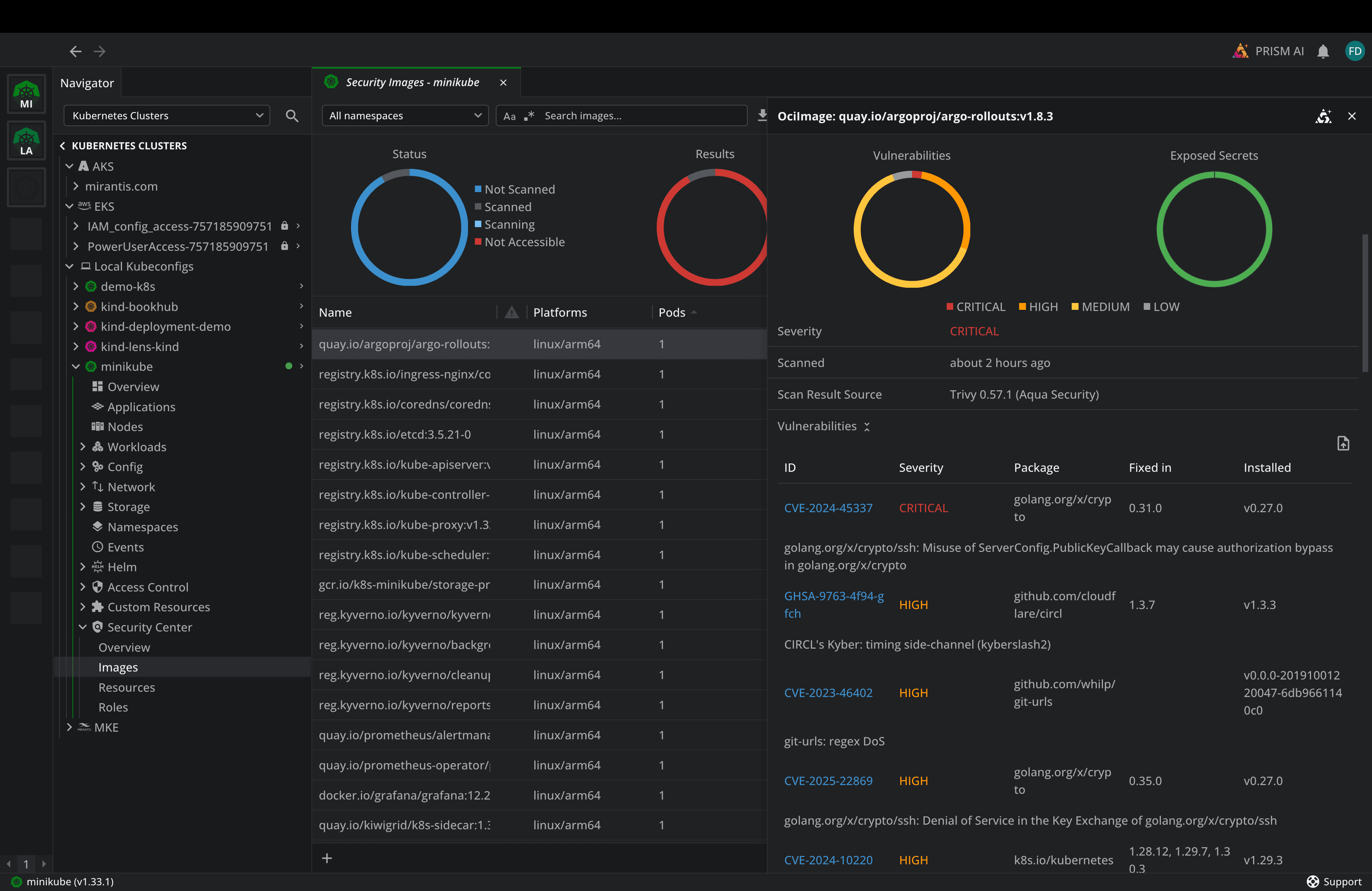
Lens Security Center runs continuous vulnerability scanning through Trivy Operator integration. It identifies CVEs across container images, checks resource configurations against Kubernetes best practices, and flags overly permissive RBAC roles. Results are exported to CSV for compliance reporting and audit trails. Instead of reacting to vulnerabilities after an incident, teams stay ahead of them. Read more
Lens also supports air-gapped deployment for environments where no outbound internet traffic is allowed, and centralized feature management that lets administrators lock down or enable specific Lens capabilities across the organization. Read more
Secure Collaboration
Lens Teamwork lets organizations onboard engineers faster, share cluster access securely, and collaborate across distributed teams without exposing the Kubernetes API or setting up VPNs. Cluster Connect creates end-to-end encrypted tunnels (AES-256-GCM + RSA-4096) with no inbound ports on your firewall. Administrators manage everything centrally through shared Spaces with full RBAC integration. Read more
Which Plan Is Right for You?
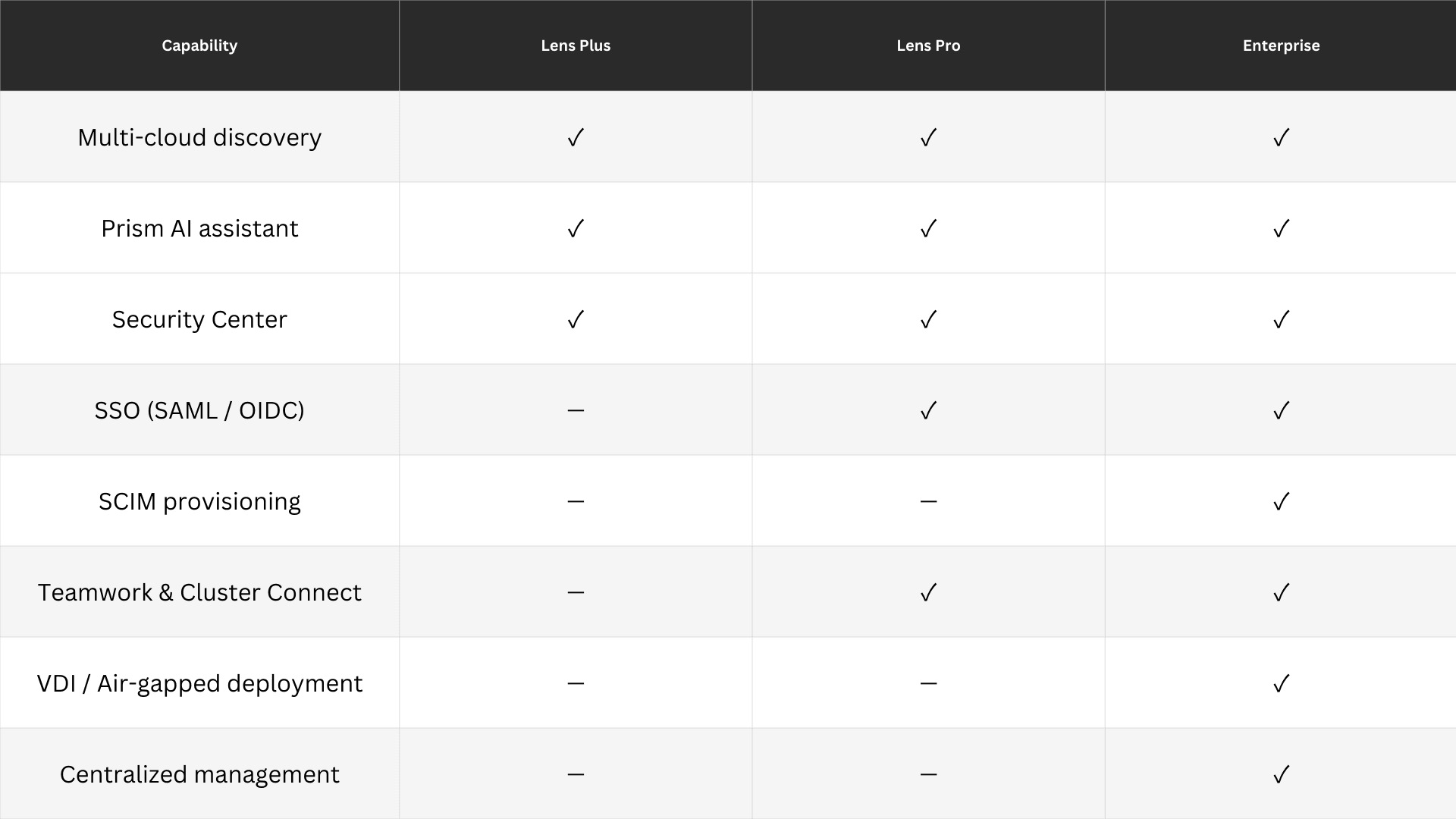
Lens Plus is for individual engineers. Lens Pro and Lens Enterprise are for organizations. See the full plan comparison at https://lenshq.io/pricing.
Get Started
To get started with Lens Kubernetes IDE, you can easily download it from here.
If you want to deep-dive into all the features that Lens Kubernetes IDE offers, check out this YouTube playlist:
https://www.youtube.com/playlist?list=PLQHLRjyPbxsrPhu5T6XCK6oqc2ywV-3nD