


How to use Kubernetes Secrets
Hard-coding sensitive data in your applications makes it very easy for attackers to gain access to your systems and compromise them. If they are visible in version control, everyone can see them, and if you are building them into images, everyone with image access can exploit them.
With Kubernetes Secrets, you can solve this issue, and in this article, you'll learn what they are, how they work, and how to use them in your organization.
What are Kubernetes Secrets?
Kubernetes Secrets are objects for storing and managing sensitive information, such as passwords, OAuth tokens, SSH keys, TLS certificates, and other data your applications might use. They are stored in Kubernetes etcd in a base64-encoded form, but they are not encrypted by default.
By using secrets, you can reduce the risk of sensitive data exposure throughout your application lifecycle. You can use them in many ways such as environment variables, command-line arguments, or as files mounted as volumes.
Why should you use Secrets?
Kubernetes secrets enable you to improve:
- Security: You get a dedicated way to handle sensitive data, keeping it separate from your application code and reducing the risk of exposure.
- Access control: With Kubernetes RBAC, you can control which users and service accounts can access specific Secrets, making it easier for your organization to enable least-priviledge.
- Separation of concerns: This enables your security teams to manage the Secret data separately, while your developers can reference secrets in application manifests without seeing the actual value
- Rotation capabilities: You can update Secrets without changing your applications, making it easier to rotate credentials.
When to use ConfigMaps instead of Secrets?
If your application configuration does not include sensitive data, use ConfigMaps instead of Secrets. ConfigMaps are meant for non-confidential settings and are easier to manage for general configuration.
Use ConfigMaps for application settings, feature flags, and environment-specific configurations that are not sensitive to exposure.
Learn more about ConfigMaps by checking this article.
How to create Secrets?
There are several ways to create Secrets. Here are some standard methods:
Using kubectl to create Secrets
The simplest way to create a Secret is with the kubectl create secret command:
kubectl create secret generic db-credentials \
 --from-literal=username=admin \
 --from-literal=password=super-secret-password
This command creates a Secret named db-credentials with two values: username and password. Kubernetes will automatically base64-encode these values.
For Docker registry credentials, Kubernetes offers a specialized command:
kubectl create secret docker-registry regcred \
 --docker-server=myregistry.azurecr.io \
 --docker-username=myuser \
 --docker-password=mypassword \
 --docker-email=user@example.com
Creating Secrets from files
If you need to store files such as TLS certificates or SSH keys, you can create a Secret directly from those files:
kubectl create secret generic tls-certs \
 --from-file=tls.crt=./server.crt \
 --from-file=tls.key=./server.key
This command creates a Secret named tls-certs from your certificate files. The file names become the keys, and the file contents are also base64-encoded.
For TLS Secrets specifically, Kubernetes has a dedicated type:
kubectl create secret tls tls-secret \
 --cert=path/to/cert.pem \
 --key=path/to/key.pem
Using YAML manifests
When working with Secrets, especially in an enterprise setup, you should define them in YAML files alongside your other Kubernetes resources. However, you need to be careful with how you manage these files, as they contain sensitive data.
apiVersion: v1
kind: Secret
metadata:
 name: db-credentials
type: Opaque
data:
 username: YWRtaW4=
 password: c3VwZXItc2VjcmV0LXBhc3N3b3Jk
The values in the data field must be base64-encoded. You can encode them with the following command:
echo -n 'admin' | base64
If you prefer to use plain text values and have Kubernetes handle the encoding, use the stringData field instead:
apiVersion: v1
kind: Secret
metadata:
 name: db-credentials
type: Opaque
stringData:
 username: admin
 password: super-secret-password
To create the Secret shown above, run this command:
kubectl apply -f secret.yaml
Important: Never commit Secret manifests with real sensitive values to version control. Use external secrets management tools or templates for these values instead.
Using Lens to create secrets
You can also use Lens to create secrets easily. To do that, head over to Config, then select Secrets, and in the end click on the “+” button in the bottom right corner:
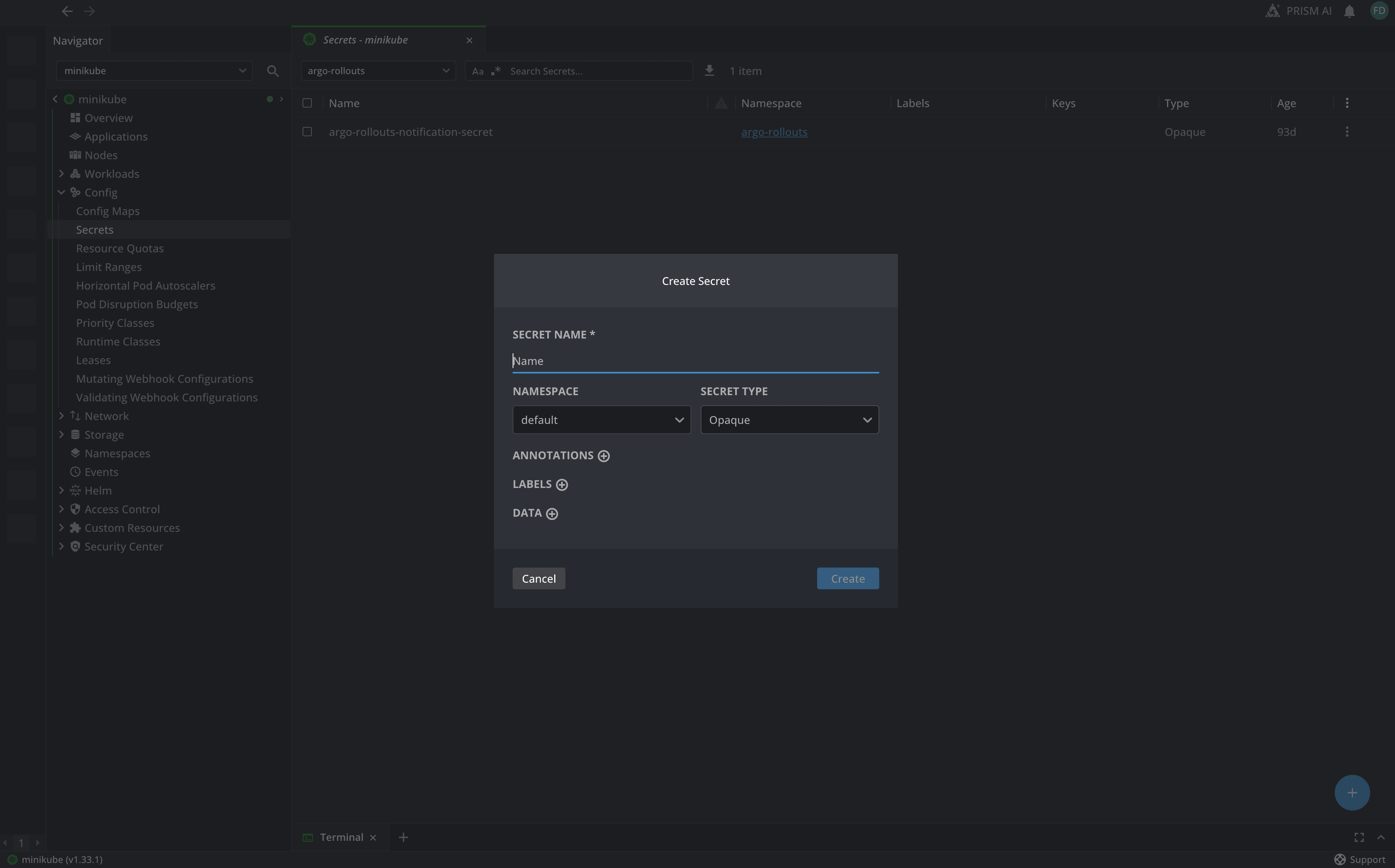
As you can see, you can easily add:
- A secret name
- Select a namespace in which the secret will be created
- Select secret type
- Add annotations and labels
- Add the secret data
Using Secrets in Kubernetes
Now that you know how to create your Secrets, let's look at how to use them in your applications.
The simplest way is to use the Secret as environment variables in your resources:
apiVersion: v1
kind: Pod
metadata:
 name: app-pod
spec:
 containers:
 - name: app-container
   image: myapp:latest
   env:
   - name: DB_USERNAME
     valueFrom:
       secretKeyRef:
         name: db-credentials
         key: username
   - name: DB_PASSWORD
     valueFrom:
       secretKeyRef:
         name: db-credentials
         key: password
In this example, the pod creates two environment variables, DB_USERNAME and DB_PASSWORD, and loads them from the db-credentials Secret. One uses the username key, and the other uses the password key.
You can also load all keys from a Secret as environment variables at once:
apiVersion: v1
kind: Pod
metadata:
 name: app-pod
spec:
 containers:
 - name: app-container
   image: myapp:latest
   envFrom:
   - secretRef:
       name: db-credentials
In this case, your environment variables will be named username and password, matching the keys in the Secret.
If your application needs secret data as files, you can mount your Secrets as volumes:
apiVersion: v1
kind: Pod
metadata:
 name: app-pod
spec:
 containers:
 - name: app-container
   image: myapp:latest
   volumeMounts:
   - name: secret-volume
     mountPath: /etc/secrets
     readOnly: true
 volumes:
 - name: secret-volume
   secret:
     secretName: db-credentials
This example mounts the Secret as files in the /etc/secrets directory. Each key in the Secret becomes a file, and the value is the file's content. Always mount Secret volumes as readOnly to avoid accidental changes.
You can also mount only specific keys from a Secret:
apiVersion: v1
kind: Pod
metadata:
 name: app-pod
spec:
 containers:
 - name: app-container
   image: myapp:latest
   volumeMounts:
   - name: tls-certs
     mountPath: /etc/tls
     readOnly: true
 volumes:
 - name: tls-certs
   secret:
     secretName: tls-secret
     items:
     - key: tls.crt
       path: server.crt
     - key: tls.key
       path: server.key
This approach lets you control exactly which Secret keys are exposed and what they are called in the filesystem.
Enabling encryption at rest
By default, Secrets are stored in etcd using base64 encoding, which is not secure. To protect your Secrets, enable encryption at rest.
Create an encryption configuration file:
apiVersion: apiserver.config.k8s.io/v1
kind: EncryptionConfiguration
resources:
 - resources:
     - secrets
   providers:
     - aescbc:
         keys:
           - name: key1
             secret: <base64-encoded-32-byte-key>
     - identity: {}
Then configure your API server to use this encryption configuration by adding the following flag:
--encryption-provider-config=/path/to/encryption-config.yaml
After you enable encryption, recreate all existing Secrets to make sure they are encrypted:
kubectl get secrets --all-namespaces -o json | kubectl replace -f -
Integrating with external secrets management
In production, connect Kubernetes to external secrets management tools such as HashiCorp Vault, its open-source alternative OpenBao, AWS Secrets Manager, Azure Key Vault, or GCP Secret Manager.
Using External Secrets Operator
The External Secrets Operator is a popular way to sync external secrets into Kubernetes:
apiVersion: external-secrets.io/v1beta1
kind: SecretStore
metadata:
 name: vault-backend
spec:
 provider:
   vault:
     server: "https://vault.yourcluster.com"
     path: "secret"
     version: "v2"
     auth:
       kubernetes:
         mountPath: "kubernetes"
         role: "my-role"
Then create an ExternalSecret that references your external secret:
apiVersion: external-secrets.io/v1beta1
kind: ExternalSecret
metadata:
 name: db-credentials
spec:
 refreshInterval: 1h
 secretStoreRef:
   name: vault-backend
   kind: SecretStore
 target:
   name: db-credentials
   creationPolicy: Owner
 data:
 - secretKey: username
   remoteRef:
     key: database/config
     property: username
 - secretKey: password
   remoteRef:
     key: database/config
     property: password
The operator will automatically copy the external secret into a Kubernetes Secret and keep it updated according to the refresh interval.
Using Secrets Store CSI Driver
The Secrets Store CSI Driver mounts secrets from external stores directly into pods without creating Kubernetes Secret objects:
apiVersion: v1
kind: Pod
metadata:
 name: app-pod
spec:
 containers:
 - name: app-container
   image: myapp:latest
   volumeMounts:
   - name: secrets-store
     mountPath: "/mnt/secrets"
     readOnly: true
 volumes:
 - name: secrets-store
   csi:
     driver: secrets-store.csi.k8s.io
     readOnly: true
     volumeAttributes:
       secretProviderClass: "vault-db-creds"
This method is more secure because secrets never exist as Kubernetes objects in etcd.
Best practices when you are working with Secrets
Here are some best practices for working with Secrets:
- Enable encryption at rest: Always enable encryption at rest for Secrets in production environments. Base64 encoding is not the same as encryption and provides little security.
- Use RBAC strictly: Limit access to Secrets using Kubernetes RBAC. Only grant the minimum necessary permissions to service accounts and users.
- Avoid environment variables for highly sensitive data: Environment variables can be exposed through process listings, crash dumps, and logs. For highly sensitive data, prefer volume mounts.
- Integrate with external secret managers: For production workloads, use external secrets management solutions like HashiCorp Vault, AWS Secrets Manager, or Azure Key Vault with the External Secrets Operator or Secrets Store CSI Driver.
- Never commit Secrets to version control: Don’t store Secret manifests with actual values in Git. Use templating tools or external secret references instead.
- Implement secret rotation: Regularly rotate your secrets and ensure your applications can handle secret updates without downtime.
- Use different namespaces to organize your applications: Secrets are namespace-scoped, so using different namespaces provides an additional isolation layer for your sensitive data.
- Audit Secret access: Enable audit logging to track who accesses Secrets and when. This helps with compliance and detecting potential security incidents.
- Set appropriate Secret size limits: Keep individual Secrets under 1MB. Larger Secrets can impact etcd performance and pod startup times.
- Use immutable Secrets when possible: For Secrets that should never change, mark them as immutable to prevent accidental modifications and improve cluster performance.
Managing Secrets with Lens Kubernetes IDE
kubectl is a good starting point for working with Secrets, but managing them across many namespaces or clusters can quickly become tedious.
Lens Kubernetes IDE offers a visual interface for managing Secrets, making the process much easier. You can view all your Secret resources, see which pods use them, and decode base64 values directly in the UI for troubleshooting.
Lens also lets you securely edit Secrets with syntax highlighting and validation, and includes a built-in terminal for quick operations. It helps you spot pods with issues related to the Secret configuration. With Lens Prism, the built-in AI assistant, you can quickly troubleshoot Secret-related pod failures.
The visual tools in Lens make it easier to understand Secret dependencies and quickly find configuration problems that would take longer to debug with kubectl alone.
Check out how easy it is to use to Kubernetes Secrets from Lens:
Key points
Secrets are essential for securely managing sensitive data in Kubernetes. They help you manage credentials, certificates, and other sensitive information across different environments while maintaining security boundaries.
In production, always use Kubernetes Secrets with encryption at rest, external secrets management, and strict RBAC policies. Remember, base64 encoding is not encryption and should not be used as a security measure.
If you want a powerful IDE to manage Kubernetes resources and troubleshoot issues with AI features, try Lens Kubernetes IDE today.